Showing posts with label Right Sidebar. Show all posts

Project 10 Blogger Template


Template name : Project 10

Author :  www.soratemplates.com

Designer :  www.orange-themes.com

Template features : Wordpress Look, 3 Columns, 4 Columns Footer, Right Sidebar, Fashion, Featured Content Slider, Fixed Width, Gray Background, Social Widget, Page Navigation Widget.

Note: You must publish at least 5 posts and your blog must be in public mode (everyone can see it), if not, you will be redirect to this site, we're really sorry for caused you this trouble.

Configure Featured Content Slider:
Login to blogger dashboard --> layout --> Edit HTML. Now scroll down to where you see the codes below:
  • <div id='layerslider' style='width: 748px; height: 300px;'>
     <div class='ls-layer' rel='slidedelay: 5000'>
     <img class='ls-bg' src='/image.jpg'/>
     ..........
Replace"image.jpg" with your slider image.

Configure Dropdown Menu:
Login to blogger dashboard --> layout --> Edit HTML. Now scroll down to where you see the codes below:
  • <ul class='menu' id='menu-top-menu'>
     <li><a href='#'><i style='font-family:Ropa Sans;'><span>Homepage</span></i></a></li>
     <li><a href='#'><i style='font-family:Ropa Sans;'><span>Blog</span></i></a></li>
     ..........
Just replace "#" with your menu item URL.

Configure Social Widget:
Search for:
  • <div class='left-social-icons'>
     <a class='social-facebook' href='#' target='_blank'><span/></a>
     <a class='social-twitter' href='#' target='_blank'><span/></a>
     ..........
Replace "#" with your Social Account URL.

Configure Page Navigation Widget:
search for:
  • var posts=3, // Number of posts in each page
        num=2, // Number of buttons will display
Read more

Accord Blogger Template


Template name : Accord

Author :  www.soratemplates.com

Designer :  color-theme.com

Template features : Pinterest Look, 3 Columns, Right Sidebar, Fashion, Featured Post Slider, Fixed Width, Gray Background, Social Widget, Header Banner, Dropdown Menu, Page Navigation Widget.

Configure Dropdown Menu:
Login to blogger dashboard --> layout --> Edit HTML. Now scroll down to where you see the codes below:
  • <div id='menu'>
    <div class='menu-main-nav-container'>
     <ul class='sf-menu sf-navbar' id='menu-main-nav'>
      <li><a href='#'>Home Features</a>
      <ul class='sub-menu'>
       <li><a href='#'>Home + Sidebar</a></li>
     ..........
Replace "#" with your menu item URL.

Configure Social Widget:
Search for:
  • <div class='top-social-block'>
     <ul>
      <li><a class='facebook-top' href='#'/></li>
      <li><a class='twitter-top' href='#'/></li>
     </ul>
    </div>
Replace "#" with your Social Account URL.

How To Change Header Banner:
find this:
  • <div class='banner'>
     <a href='#'><img height='60' src='/banner.jpg' width='468'/></a>
    </div>
Now replace:
  • "#" with your banner URL.
  • "banner.jpg" with your banner image.

Configure Page Navigation Widget:
search for:
  • var posts=4, // Number of posts in each page
        num=2, // Number of buttons will display
Read more

Eclipse Blogger Template


Template name : Eclipse

Author :  www.soratemplates.com

Designer :  www.devilcantburn.com

Template features : Wordpress Look, 2 Columns, 4 Columns Footer, Right Sidebar, Featured Content Slider, Fixed Width, Social Widget, Dropdown Menu.

Configure Featured Content Slider:
Login to blogger dashboard --> layout --> Edit HTML. Now scroll down to where you see the codes below:
  • <div class='nivoSlider' id='nivo_slider'>
     <a href='#'><img height='400' src='/image.jpg' width='920'/></a>
     ..........
Replace:
  • "#" with your featured post URL.
  • "image.jpg" with your slider image.

Configure Dropdown Menu:
Login to blogger dashboard --> layout --> Edit HTML. Now scroll down to where you see the codes below:
  • <ul class='main_menu' id='menu-menu-1'>
     <li><a href='#'><span class='gfont'>Home</span> <span class='subline'>&#8592; Back</span></a></li>
     <li><a href='#'><span>News</span><span class='subline'>Read Us!</span></a>
     <ul class='sub-menu'>
      <li><a href='#'>Attractive Design</a></li>
      <li><a href='#'>Inspirations</a></li>
     ..........
Replace "#" with your menu item URL.

Configure Social Widget:
Search for:
  • <div id='social_networks'>
     <ul>
      <li class='sorting-01 facebook'><a href='#'><span class='inv'>Facebook</span></a></li>
      <li class='sorting-03 twitter'><a href='#'><span class='inv'>twitter</span></a></li>
      <li class='sorting-02 googleplus'><a href='#'><span class='inv'>googleplus</span></a></li>
     ..........
Replace "#" with your Social Account URL.
Read more

Replay Blogger Template


Template name : Replay

Author :  www.soratemplates.com

Designer :  www.themextemplates.com

Template features : Wordpress Look, 2 Columns, Right Sidebar, Music, Featured Content Slider, Fixed Width, Gray Background, Social Widget, Dropdown Menu, HTML5 Music Player, Page Navigation Widget.

Configure Featured Content Slider:
Login to blogger dashboard --> layout --> Edit HTML. Now scroll down to where you see the codes below:
  • <div class='ribbon-slide'>
     <ul>
      <li class='slide-400'><a href='#'>
     <img class='fullwidth' height='400' src='/image.jpg' width='400'/></a>
      </li>
     ..........
Replace"image.jpg" with your slider image.

Configure Dropdown Menu:
Login to blogger dashboard --> layout --> Edit HTML. Now scroll down to where you see the codes below:
  • <ul class='menu' id='menu-main-menu'>
     <li><a href='#'>News</a>
      <ul class='sub-menu'>
       <li><a href='#'>Ribbon Slider</a></li>
       <li><a href='#'>Fade Slider</a></li>
     ..........
Just replace "#" with your menu item URL.

Configure Social Widget:
Search for:
  • <a class='facebook' href='#' target='_blank' title='Facebook'/>    
    <a class='tumblr' href='#' target='_blank' title='Tumblr'/> 
    <a class='twitter' href='#' target='_blank' title='Twitter'/>
Replace "#" with your Social Account URL.

Configure Page Navigation Widget:
search for:
  • var posts=5, // Number of posts in each page
        num=2, // Number of buttons will display

Configure Music Player:
search for:
  • <div class='playlist'>
     <a href='/song1.mp3'>Song Title 1</a>
     <a href='/song2.mp3'>Song Title 2</a>
    </div>
Replace song.mp3 and Song Title as you want.
Read more

FitnessMag Blogger Template


Template name : FitnessMag

Author :  www.soratemplates.com

Designer :  www.wpexplorer.com

Template features : Wordpress Look, 3 Columns, Right Sidebar, Magazine, Featured Content Slider, Fixed Width, Gray Background, Social Widget, Dropdown Menu, Header Banner, Page Navigation Widget.

Configure Featured Content Slider:
Login to blogger dashboard --> layout --> Edit HTML. Now scroll down to where you see the codes below:
  • <div class='flexslider' id='slider'>
    <ul class='slides'>
     <li class='slide'><a href='#' target='_self'><img src='.../image.jpg'/></a>
    <div class='caption'>Awesome Blogging Theme! </div></li> 
     ..........
Replace:
  • "#" with your featured post URL.
  • "image.jpg" with your slider image.

Configure Dropdown Menu:
Login to blogger dashboard --> layout --> Edit HTML. Now scroll down to where you see the codes below:
  • <ul class='sfmenu' id='menu-main'>
     <li><a href='#'>Category 1</a></li>
     <li><a href='#'>Category 2</a>
      <ul class='sub-menu'>
       <li><a href='#'>This is a dropdown</a></li>
     ..........
Replace "#" with your menu item URL.

Configure Social Widget:
Search for:
  • <h2>Follow Us</h2>
    <ul class='clearfix'>
     <li class='social-twitter'><a class='social-icon' href='#'><img src='.../twitter.png'/></a></li>
     <li class='social-facebook'><a class='social-icon' href='#'><img src='.../facebook.png'/></a></li>
     ..........
Replace "#" with your Social Account URL.

Configure Page Navigation Widget:
search for:
  • var posts=4, // Number of posts in each page
        num=2, // Number of buttons will display

How to change Author Section:
Find this:
  • <h3 class='heading-border'><span>Author</span></h3>
    <div id='author-image'>
    <a href='#'><img class='avatar' height='60' src='.../logo.png' width='60'/></a>
    </div> 
    <div id='author-bio'>
    <h4>Written by <a href='#'>Admin</a></h4>
    <p>Aliquam molestie ligula vitae nunc...</p>
    </div>
Read more

VideoBox Blogger Template


Template name : VideoBox

Author :  www.soratemplates.com

Template features : Wordpress Look, 4 Columns, Right Sidebar, 4 Columns Footer, Portfolio, Featured Video Slider, Fixed Width, Wood Background, Dropdown Menu, Header Banner, Page Navigation Widget.

Configure Featured Video Slider:
Login to blogger dashboard --> layout --> Edit HTML. Now scroll down to where you see the codes below:
  • <ul class='slides'>
     <li class='item'>
     <p><iframe frameborder='0' height='315' src='http://www.youtube.com/embed/Ok2VamxrYAY' width='560'/></p>
     </li>
     ..........
    <ul class='thumbs pagination'>
     <li><span class='youtube-temp'/>
     <span class='hover-bg'/>
     <a class='title' href='#' rel='0'>Lorem ipsum dolor sit amet</a>
     <a class='link' href='#'/>
     </li>
     ..........
Replace:
  • "#" with your featured video URL.
  • "http://www.youtube.com/embed/Ok2VamxrYAY" with your youtube video URL.

Configure Dropdown Menu:
Login to blogger dashboard --> layout --> Edit HTML. Now scroll down to where you see the codes below:
  • <nav class='primary'>
    <ul class='sf-menu' id='topnav'>
     <li><a href='#'><span class='right'>Home</span></a></li>
     <li><a href='#'><span class='right'>Portfolio</span></a>
    <ul class='sub-menu'>
     <li><a href='#'><span class='right'>Portfolio 1 col</span></a></li>
     ..........
Replace "#" with your menu item URL.

Configure Page Navigation Widget:
search for:
  • var posts=9, // Number of posts in each page
        num=2, // Number of buttons will display
Read more

Christmas Gifts Blogger Template


Template name : Christmas Gifts

Author :  www.soratemplates.com

Template features : Wordpress Look, 2 Columns, Right Sidebar, Christmas, Portfolio, Featured Content Slider, Fixed Width.

Configure Featured Content Slider:
Login to blogger dashboard --> layout --> Edit HTML. Now scroll down to where you see the codes below:
  • <div class='boxgrid captionfull'>
     <a href='#'><img height='269' src='/slider.jpg' width='296'/></a>
     <div class='cover boxcaption' style=' top:269px; cursor: pointer;'>
     <h3 class='entry-title'>christmas decoration #1</h3>
     <div class='entry-content'><p>$57</p></div>
     <a class='more' href='#'>read more</a>
     </div>
    </div>
     ..........
Replace:
  • "#" with your featured post URL.
  • "image.jpg" with your slider image URL.

Read more

TechBoard Blogger Template


Author Name and URL : Lasantha Bandara / http://www.premiumbloggertemplates.com/
Original Designer URL : http://fthemes.com/techboard-free-wordpress-theme/
Advanced Details : http://www.premiumbloggertemplates.com/2012/06/techboard-premium-blogger-template.html
Read more

iGaming


Description: 2 column with right sidebar, 3 column footer, magazine style template blogspot, slider featured content, dropdown menu, social button, tabview ready, auto summary post and suitable for gamer blogs

Author Lasantha
Read more

Dream Home


Description: 2 column with right sidebar, magazine style template blogspot, pagination for blogger ready, simple and clean design template, featured content slideshow, summary post, and suitable for family or travelling blogs

Author Lasindu Nadishan
Read more

HomeDesign


Description: 2 column with right sidebar, magazine style blogspot template, auto featured content, and designed for home decoration or interior blogs

Author Klodian
Read more

Biz Daily


Description: 2 column with right sidebar, creative design template, small welcome for short description about you or your blog, designed for business blogs

Author EZwpthemes
Read more

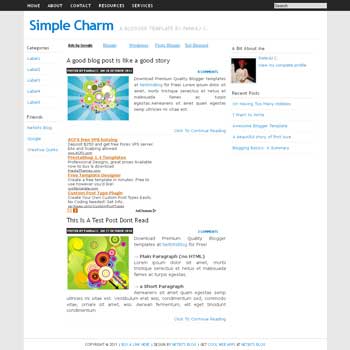
Simple Charm


Description: 3 column with left and right sidebar, clean, minimalist and simple design template, ads ready, fast loading blog, and more

Author Pankaj C
Read more

Game Base


Description: 2 column with right sidebar, 3 column footer, 3 column top, magazine style template blogspot, featured content slider, pagination for blogger ready, summary post, designed for games blogs

Author Lasindu Nadishan
Read more

Inspiration


Description: 2 column with right sidebar, magazine style template blogspot, image slideshow featured content, clean and minimalist design template, and more

Author Nancy
Read more

TechVector


Description: 3 column with left and right sidebar, magazine style blogspot template, auto featured content, designed for tech related blog

Author Klodian
Read more

Black & White


Description: 2 column with right sidebar, magazine style blogspot template, auto featured content, and more

Author Klodian
Read more

Conventy


Description: 3 column blogger template with right sidebar, 4 column footer, magazine style template blogspot, slider featured content, tabview ready, dropdown menu, social button, clean design template, auto summary post and more

Author Lasantha
Read more

BlueCircle


Description: 2 column, right sidebar, magazine style blogspot template, auto featured content, designed for all type of Google blog

Author Klodian
Read more

HappyChildren


Description: 3 column, left and right sidebar, magazine style blogspot template, auto featured content, designed for blog about kids

Author Klodian
Read more


Recent Comments